
FEWA Bill Payment Online
You can use FEWA bill view and pay service provided by etihadwe website, through the following link listed below:
FEWA Bill Payment Steps
You can view and pay your fewa bill through etihadwe official website, by following these steps:
- Go to Bill payment page through etihadwe website “from here”.
- Click on “Start Service” button.
- Enter your account number.
- Provide your phone number.
- Write your email address.
- Enter the security code shown in the image.
- Click on “Search”.
- View your bill details.
- Complete the process by paying the bill using the available payment methods.
See also: FEWA Quick Pay Online
FEWA Bill Payment Steps via App
You can use etihadwe application to view and pay your bills, through the following steps:
- Download Etihadwe application on your device through the following links:
- Open etihadwe application after downloading it.
- From the main screen click on “View and Pay Bill”.
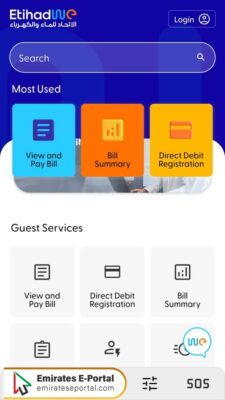
- Enter your account number in the designated field.
- Click “Search”.
- Check the summary of your bill.
- Click on “Pay Now”.
- Complete the process with the available payment methods.
Questions & Answers
You can view and pay your FEWA bill through the Etihad WE website by entering your account details and selecting a payment method.
Payments can be made via credit/debit cards, self-service kiosks, banks, and exchange centers.
You can check your bill details by entering your account number on the bill payment page.
Yes, some banks offer auto-debit options for FEWA bill payments.
Ensure your payment details are correct and your account has sufficient funds. Contact FEWA support if the issue persists.